Meet Pgishonim
Laptop Cart
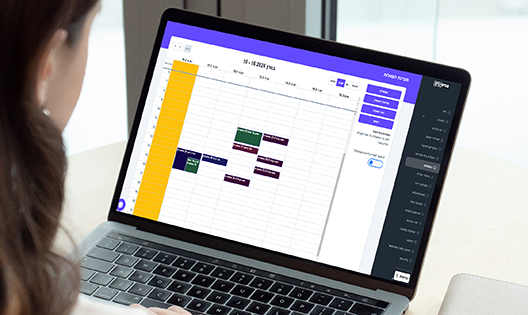
Pgishonim provides an innovative solution for managing school laptop carts.
The system enables teachers to borrow and return laptops with ease, prevents scheduling conflicts, and provides full tracking of all devices.
- Approved by the Israeli Ministry of Education
- 600+ schools
- 18 modules in one system
What's Inside?
All the tools your school needs, in one place, with an intuitive interface
Inventory Management
The system provides real-time tracking of laptop inventory, including current location, technical status, scheduled reservations, and usage. This allows the school to manage laptops efficiently and cost-effectively, improving service for students and teachers.
Conflict Prevention
The system calculates available laptop inventory before each reservation and prevents scheduling conflicts. This ensures teachers can reserve the laptops they need, even if multiple requests are made at the same time.
Advance Reservation
Teachers can reserve laptops in advance for their lessons, for any required period. This allows the facilities manager or IT coordinator to prepare ahead for lending, ensuring laptops are available when teachers need them.
Easy Facilities Management
The facilities manager can view all scheduled reservations in the system, including lesson details, number of laptops required, and technical status. This enables the facilities manager to know exactly how many laptops to prepare for each lesson, preventing shortages.
Full Transparency
The management team can access complete information on laptop status, including technical condition, usage reports, and reservation history. This enables the management team to make informed decisions about laptop management at the school.
Secure Personal Login
Teachers and staff each sign in with their own secure account, so every reservation and loan is tracked to the right person.
Web & App
Available as both a website and a mobile app, so the facilities manager and teachers can reserve and track laptops anytime, anywhere.
Proven Track Record
Pgishonim has been operating for over 6 years in numerous schools across the country and enjoys the highest ratings.
Getting Started Is Simple
A quick and easy onboarding process — here's what to expect
Define Inventory
In the first step, the school defines the number of laptops available for lending. This allows the system to calculate available inventory at any time and ensure teachers can reserve the laptops they need.
Reserve Laptops
In the second step, teachers reserve laptops in advance for their lessons. This allows the facilities manager or IT coordinator to prepare ahead for lending and ensure laptops are available for teachers during class.
Prepare Laptops for Lending
In the third step, the facilities manager or IT coordinator prepares the laptops for lending. This includes checking that the laptops are in working order and installing any required software and files.
Live Lending Tracking
In the fourth step, you can track laptop status and who currently has them. This gives the school management team full visibility into laptop usage and helps improve device management.
What Our Clients Say
Principals, coordinators and teams who already work with us

Pgishonim is a powerful tool for managing the laptop cart at school. As the school's IT coordinator, I am responsible for all of the school's computing systems, including the laptop cart. In the past, managing the laptop cart was a complicated and cumbersome process. Teachers would call me to find out whether any laptops were available, and it was hard to keep track of all the loans. Since we started using Pgishonim, my life has become much easier. The system lets teachers reserve the laptops they need in advance, so I know exactly how many laptops I have to prepare for each lesson. It also prevents situations where there are not enough laptops to go around. In addition, the system gives me real-time tracking of the status of the laptops. That lets me see who is using each computer and when it is due back. It helps me make sure the laptops are available for the teachers when they need them. Pgishonim is a powerful tool that can help you manage the laptop cart efficiently and economically. I warmly recommend the system to any school that has a laptop cart.

Pgishonim is an essential management tool for a school that uses laptops. The system provides real-time tracking, prevents conflicts and allows advance reservations, and it lets school administrators manage the laptops efficiently and economically. As a school principal, I find the system very useful. It lets me track the current location, the technical status and the planned loans of every laptop in the school. That gives me full information about the state of the computers and lets me plan their management more efficiently. In addition, the system calculates the available laptop stock before every loan and prevents conflicts between reservations. That ensures teachers can reserve the laptops they need, even if they request them at the same time. Finally, teachers can reserve the laptops they need for their lessons in advance, for whatever period is required. That lets me prepare for the loans ahead of time and make sure the laptops are available for the teachers. All in all, I find Pgishonim an efficient and important tool for managing the laptop cart at school. The system lets me manage the laptops efficiently, economically and transparently, and improve the service we give to students and teachers.

As an IT coordinator, I am responsible for managing the laptops at school. In the past, managing the computers was a complicated and cumbersome process. It was hard to keep track of the stock, to make sure the computers were in working order and to prevent conflicts between reservations. Pgishonim has made my work far easier. It provides real-time tracking of the stock, calculates the available laptop stock before every loan and prevents conflicts between reservations. I am very pleased with the system. It is efficient, convenient to use, and gives me all the information I need in order to manage the laptops efficiently.

Pgishonim is the best laptop cart management system I have come across. It is light to use, highly efficient and prevents conflicts between reservations. As the school caretaker, I have to make sure the laptops are available for the teachers at lesson time. In the past it was hard for me to keep track of the loans and the stock. I had to check the carts by hand to see which computers were available, and that could take a lot of time and effort. With Pgishonim, all the loans are managed automatically. I can easily see which laptops are available, and I can reserve computers for teachers in advance. That lets me focus on other tasks, and it is far more efficient. Pgishonim also prevents conflicts between reservations. In the past there were cases where two teachers asked for the same laptop at the same time. That could cause problems, and an alternative had to be found. With Pgishonim that no longer happens. The system makes sure teachers can reserve the laptops they need, even if they request them at the same time. It helps me keep the teachers satisfied, and it lets me guarantee that the laptops are available for the students. I warmly recommend Pgishonim to any school that has a laptop cart. It is a great system that can help you manage your laptops more efficiently.
Laptop Cart Management — Smart School Technology


A Comprehensive Solution for Every School Need
Choose the modules that fit your school
Student Registration
- Customizable registration forms
- Schedule and conduct interviews with candidates
- Friend-selection form option
- AI-powered automatic class placement
Parent-Teacher Conferences
- Smart scheduling based on availability and conflicts
- Real-time meeting progress tracking
- Automated reminders before meetings
- Online, in-person, or hybrid meetings
Early Dismissal & Tardiness
- Online parent requests for early dismissal
- Digital exit permits issued in minutes
- Instant alerts to approving staff
- Tardiness reporting by parents
Student Transportation
- Plan multiple transportation routes
- Assign students to routes by zone
- Attendance marking by transport supervisor
- Comprehensive attendance and absence reports
Laptop Cart Management
- Inventory management and conflict prevention
- Simple and friendly borrowing interface
- Reserve laptops up to X days in advance
- Precise tracking of all borrowed devices
Teacher Duty Roster
- Customizable duty schedule for school needs
- Complete notification system for teacher duties
- Start and end duty reporting
- Comprehensive reports for duty coordinator
Maintenance & Tickets
- Staff report issues to maintenance team
- Track school equipment inventory
- Real-time alerts on issue resolution progress
- Analytics reports for logistics and IT issues
Digital Signage
- Design school display screens in the platform
- Create custom content with built-in CANVA integration
- Schedule screens for specific times
- Update school displays remotely — no physical contact needed
Parent Approvals & Digital Signatures
- Manage forms with digital signatures
- Perfect for trips, medical forms, educational forms
- Distribute forms via WhatsApp, SMS, or push notification
- Track and remind parents who haven't signed
Library Management
- One-click book lending
- Automatic reminders for overdue items
- Advanced algorithm to prevent conflicts
- Students and teachers can check availability remotely
Event Management
- Manage all trip or event preparations in one place
- Dynamic task lists for each event
- Digital signatures from relevant stakeholders
- Collaboration between teachers and administration
Parent Payments
- Manage all school payments in one place
- Automatic payment reminders to parents
- Real-time payment tracking
- Online payment option through the platform
Multi-Channel Messaging
- Send WhatsApp, SMS, and email messages securely
- Target specific groups of students and parents
- Real-time response tracking
- Dedicated caller ID for feature phones
Staff Meetings
- Meetings between homeroom teachers and subject teachers
- Real-time meeting progress tracking
- Meeting documentation and report generation
- Recurring meeting scheduling with single setup
School Bells
- Automated school bell scheduling
- Multiple timetables for different days of the week
- Holiday and vacation settings — no bells on days off
- Full remote control via admin panel
Personal Meetings
- Manage student-teacher personal meetings
- Perfect for report card distribution and tutoring
- Live meeting progress tracking
- Built-in educational content for lessons and assessments
School Portal
- Professional, customizable design for the school's branding
- Photo & media gallery from events and activities
- News, updates, and events calendar
- Showcase the teaching staff, vision, and values
School Lockers
- Assign students to lockers in one click
- Manage codes, keys, and locks
- Fault reporting and maintenance tracking
- Orderly end-of-year process with locker returns
We'd Love to Hear From You!
Let us tell you more about the platform and help you get started