Meet Pgishonim
Digital Signage
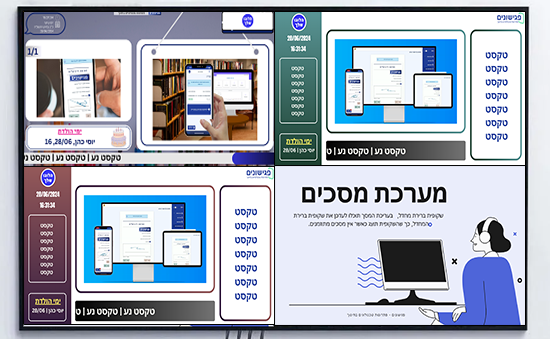
Pgishonim is an advanced digital signage management system that allows schools to manage, design, and schedule their display screens easily and conveniently.
The system works on any device with internet access, a streaming device, or a Smart TV.
- Approved by the Israeli Ministry of Education
- 600+ schools
- 18 modules in one system
What's Inside?
All the tools your school needs, in one place, with an intuitive interface
Screen Management
Easily configure the designs assigned to each screen in your school.
Design Interface
Design your screens within the system using an advanced design interface, or use the built-in integration with the CANVA design platform.
Scheduling
Schedule slide presentations on your screens according to your needs.
Live Screen Updates
Update your screens in real time, without needing to physically access them.
No Software Installation
The system works without any special software installation, so it can be used on any screen with internet access or a Smart TV.
Build Presentations
Group several slides into a single presentation and easily choose which slides play together.
Share Information
Easily broadcast important information to parents and students, improving school communication.
Proven Track Record
Pgishonim has been operating for over 6 years in numerous schools across the country and enjoys the highest reviews.
Getting Started Is Simple
A quick and easy onboarding process — here's what to expect
Set Up Screens
The school defines the number of existing screens in the building.
Design Slides
The school designs the slides to be displayed on the screens using the system's advanced design interface or through the CANVA integration.
Create Presentations
The system administrator defines which slides will be grouped together as a presentation.
Schedule Screens
The system administrator schedules which presentations will appear on which screens and when.
Easy and convenient management: The system allows you to easily configure the designs for each screen in your school, schedule slide presentations, and update screens in real time.
Advanced design: The system includes an advanced design interface that lets you create professional slides in minutes.
Set up screens: The school defines the number of existing screens.
Design slides: The school designs the slides to be displayed using the system's design interface.
Create presentations: The system administrator defines which slides will be grouped together as a presentation.
Schedule screens: The system administrator schedules which presentations will appear on which screens and when.
What Our Clients Say
Principals, coordinators and teams who already work with us

Pgishonim is an excellent digital signage management system for schools. It is easy to use, flexible and saves time. The system lets us create and schedule presentations easily, using customized designs. We can also monitor the activity of our screens to make sure they are working properly. Since we started using the system we have saved a great deal of time managing our screens. We can now focus on other things, such as teaching and students. The system has improved our communication with parents and students. We can now distribute important information easily and efficiently. I warmly recommend Pgishonim to every school. It is an essential tool for managing school screens efficiently.

I am the IT coordinator at an elementary school of about 500 students. About a year ago we decided to use the Pgishonim digital signage system. Our previous system was outdated and inefficient. It was hard to operate, and it did not let us create and schedule presentations efficiently. We chose Pgishonim after hearing warm recommendations from colleagues. This system gave us all the advantages we were looking for: it is easy to operate, even for new users. It is very efficient, and lets us create and schedule presentations precisely. It is flexible, and lets us adapt it to the particular needs of our school. Since we moved our screen management over to Pgishonim, we have seen a significant improvement in the process. The system lets us create presentations easily and quickly. We can use customized designs to create attractive and interesting presentations. The system also lets us schedule exactly when presentations are shown. We can set them to run automatically, or start them manually. We are very pleased with the Pgishonim digital signage system. It has significantly improved the way screens are managed at our school, and has made it more efficient and easier for everyone.

I am an elementary school principal, and for many years I tried to find a digital signage system that would be easy to use, efficient and able to meet our school's needs. I recently discovered Pgishonim, and it was exactly what I had been looking for. The system is simple to understand and easy to operate. Screens can be set up quickly, slides are easy to design, and scheduling when they appear is simple and easily adjusted. One of my favorite features in the system is the ability to schedule when the slides are displayed. That lets us show important information on our screens even when no staff member is present. I also appreciate the fact that the system works without having to install any special software. That means we can use it on any screen with an internet connection or any Smart TV. All in all, I am very pleased with Pgishonim. It is an excellent digital signage system that meets all of our school's needs.

I have been working as a school principal for the past 6 years, and I was always looking for an easy and efficient way to manage the screens at school. About a year ago I discovered Pgishonim, and it was a revolution for me. The system is very easy to use, and it let me set up every screen in the school within a few minutes. I can design the slides I want to display and adapt them to my needs. I can also schedule the slides on the screens in advance, so that they are always up to date. One of my favorite features in the system is the ability to update the screens in real time. That was especially useful during parents' evenings, when I had to keep updating the information on the screens. In short, Pgishonim is a great tool for managing screens at school. It is easy to use, flexible and efficient. I warmly recommend it to every school.
Digital Signage Management for Schools


A Comprehensive Solution for Every School Need
Choose the modules that fit your school
Student Registration
- Customizable registration forms
- Schedule and conduct interviews with candidates
- Friend-selection form option
- AI-powered automatic class placement
Parent-Teacher Conferences
- Smart scheduling based on availability and conflicts
- Real-time meeting progress tracking
- Automated reminders before meetings
- Online, in-person, or hybrid meetings
Early Dismissal & Tardiness
- Online parent requests for early dismissal
- Digital exit permits issued in minutes
- Instant alerts to approving staff
- Tardiness reporting by parents
Student Transportation
- Plan multiple transportation routes
- Assign students to routes by zone
- Attendance marking by transport supervisor
- Comprehensive attendance and absence reports
Laptop Cart Management
- Inventory management and conflict prevention
- Simple and friendly borrowing interface
- Reserve laptops up to X days in advance
- Precise tracking of all borrowed devices
Teacher Duty Roster
- Customizable duty schedule for school needs
- Complete notification system for teacher duties
- Start and end duty reporting
- Comprehensive reports for duty coordinator
Maintenance & Tickets
- Staff report issues to maintenance team
- Track school equipment inventory
- Real-time alerts on issue resolution progress
- Analytics reports for logistics and IT issues
Digital Signage
- Design school display screens in the platform
- Create custom content with built-in CANVA integration
- Schedule screens for specific times
- Update school displays remotely — no physical contact needed
Parent Approvals & Digital Signatures
- Manage forms with digital signatures
- Perfect for trips, medical forms, educational forms
- Distribute forms via WhatsApp, SMS, or push notification
- Track and remind parents who haven't signed
Library Management
- One-click book lending
- Automatic reminders for overdue items
- Advanced algorithm to prevent conflicts
- Students and teachers can check availability remotely
Event Management
- Manage all trip or event preparations in one place
- Dynamic task lists for each event
- Digital signatures from relevant stakeholders
- Collaboration between teachers and administration
Parent Payments
- Manage all school payments in one place
- Automatic payment reminders to parents
- Real-time payment tracking
- Online payment option through the platform
Multi-Channel Messaging
- Send WhatsApp, SMS, and email messages securely
- Target specific groups of students and parents
- Real-time response tracking
- Dedicated caller ID for feature phones
Staff Meetings
- Meetings between homeroom teachers and subject teachers
- Real-time meeting progress tracking
- Meeting documentation and report generation
- Recurring meeting scheduling with single setup
School Bells
- Automated school bell scheduling
- Multiple timetables for different days of the week
- Holiday and vacation settings — no bells on days off
- Full remote control via admin panel
Personal Meetings
- Manage student-teacher personal meetings
- Perfect for report card distribution and tutoring
- Live meeting progress tracking
- Built-in educational content for lessons and assessments
School Portal
- Professional, customizable design for the school's branding
- Photo & media gallery from events and activities
- News, updates, and events calendar
- Showcase the teaching staff, vision, and values
School Lockers
- Assign students to lockers in one click
- Manage codes, keys, and locks
- Fault reporting and maintenance tracking
- Orderly end-of-year process with locker returns
We'd Love to Hear From You!
Let us tell you more about the platform and help you get started